WhatsApp Parental Controls for Teens: What Parents Need to Know 2026
Is your teenager constantly chatting on WhatsApp? You’re probably not alone in wondering who they’re talking to, what groups they’re joining, and whether their privacy settings are actually protecting them. WhatsApp’s new parental controls aim to give parents more peace of mind without letting them read every private conversation.
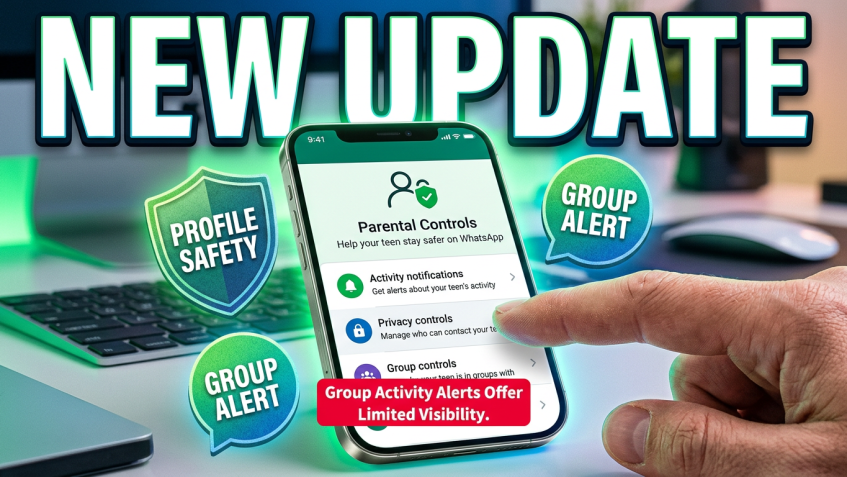
Announced on September 30, 2026, these optional controls are rolling out for teen accounts on Android and iOS. Parents can manage certain privacy settings, receive group activity alerts, and limit access to Channels, Status and Meta AI. Here’s what the changes mean for your family.
Why WhatsApp Parental Controls Matter
WhatsApp has become part of how teenagers keep up with friends, schoolwork and family. According to Pew Research Center’s 2025 report, roughly one in four U.S. teenagers use WhatsApp, up from 17% in 2022. As more teens use messaging apps, parents need practical ways to manage unwanted contacts and inappropriate content without turning every conversation into an argument about privacy.
1. Parents Can Manage WhatsApp Privacy Settings
Teenagers don’t always think twice about who can see their profile photo or add them to group chats. With WhatsApp’s parental controls, you can help manage those settings and prevent protected restrictions from being relaxed without your approval.
- Profile photo privacy: Choose who can see your teen’s profile picture.
- Group invitations: Control who can add your teenager to WhatsApp groups.
- Parent PIN: Require approval before a teen makes supervised privacy settings less restrictive.
For example, if your child keeps getting added to unfamiliar groups, you can tighten their invitation settings together. They can still chat with friends, but they have better protection against unwanted group invitations.
2. Group Activity Alerts Help Parents Stay Informed
A WhatsApp group that starts with a few classmates can quickly grow into a large conversation with people your teen barely knows. WhatsApp now lets parents receive notifications about certain group changes, giving them a reason to check in without reading the messages themselves.
- Get notified when your teen joins a group.
- Receive an alert when they leave a group.
- Get updates when a group grows significantly, including membership thresholds of 30, 100 or 250.
These alerts aren’t meant to track every conversation. Think of them as a heads-up. If your teenager suddenly joins a large group, you can simply ask what it’s for and whether they know the people involved.
3. Parents Can Limit Channels and Status Updates
WhatsApp isn’t just about sending messages anymore. Teenagers can follow Channels, browse updates and share Status posts with their contacts. The new parental controls let families put some boundaries around those features.
- Channels: Limit which Channels your teen can access and how they use the feature.
- Status viewing: Manage whose Status updates your teenager can see.
- Status sharing: Control who can view the Status updates your teen posts.
If your teenager is new to WhatsApp, starting with stricter settings may make sense. You can always loosen them later as they get better at handling their online privacy.
4. Meta AI Comes With Additional Safety Settings
Your teen may already use AI tools to answer questions or get ideas for homework. WhatsApp includes Meta AI, and parents can now choose how much access their teenager gets to certain types of AI content.
- Standard (13+): The default experience allows discussions generally aligned with content ratings for ages 13 and older.
- Limited Content: Applies stricter topic restrictions and makes Meta AI features that rely on Private Processing unavailable.
The Limited Content option may be useful for families who want tighter restrictions. Still, remind your teen that AI can give incorrect answers and that sharing passwords, addresses or other private details with an AI assistant isn’t a good idea.
5. Can Parents Read Their Teen’s WhatsApp Messages?
No. WhatsApp’s parental controls do not give parents access to private chats or calls. Personal messages and calls remain protected by end-to-end encryption. That means the new supervision features cannot be used to read a teenager’s conversations or listen to their calls.
- Parents cannot read private WhatsApp messages through parental controls.
- Parents cannot listen to voice or video calls.
- Group alerts do not reveal group message contents.
- WhatsApp continues to protect personal messages and calls with end-to-end encryption.
That’s an important boundary. You can help your teenager stay safer without needing to know everything they discuss with their friends.
6. How to Set Up WhatsApp Parental Controls
Setting up WhatsApp parental controls starts on your teenager’s phone. You don’t need to install a separate parental control app to use WhatsApp’s built-in features.
- Open WhatsApp on your teenager’s Android phone or iPhone.
- Go to Settings > Parental controls.
- Confirm your teenager’s birthdate.
- Follow the instructions to link their WhatsApp account to yours.
- Create a parent PIN.
- Review the available privacy, group, Channel, Status and Meta AI settings.
You can change the settings or turn the controls off later. Keep in mind that the feature is rolling out gradually, so you might not see it in your WhatsApp settings yet. For the latest instructions, visit the official WhatsApp parental controls page.
7. Do You Still Need a Parental Control App?
WhatsApp’s built-in controls are helpful, but they only cover WhatsApp. They won’t show how much time your teen spends gaming, browsing websites or using other social apps. If you want a broader picture of their phone habits, a dedicated parental control app may help.
- Screen-time limits: Set reasonable daily usage limits.
- App activity reports: Understand which apps your teen uses most.
- App restrictions: Limit access to selected applications.
- Web filtering: Help block inappropriate websites.
- Device activity insights: Spot usage patterns that may deserve a conversation.
Not every parental control app offers the same features, and device restrictions vary. Check the privacy policy before choosing one, and don’t assume third-party software can read WhatsApp’s encrypted chats.
8. Make Online Safety a Conversation, Not a Fight
Even the best parental controls won’t prevent every uncomfortable online experience. What matters just as much is whether your teenager feels comfortable telling you when something goes wrong. A few simple ground rules can make a difference.
- Don’t respond to suspicious messages from strangers.
- Think carefully before joining unfamiliar groups.
- Never share passwords, addresses or sensitive personal information.
- Tell a trusted adult about threatening or inappropriate messages.
- Review privacy settings together from time to time.
Try explaining why you’ve enabled a restriction instead of simply locking everything down. Teenagers are more likely to take online safety seriously when they understand the risks and have some say in the rules.
Frequently Asked Questions About WhatsApp Parental Controls
Does WhatsApp have parental controls for teenagers?
Yes. WhatsApp announced optional parental controls for teen accounts on September 30, 2026. The features are rolling out gradually on Android and iOS.
Can I see who my teenager is messaging on WhatsApp?
The parental controls provide certain activity notifications and privacy management options, but they do not give parents access to private message contents or calls.
Can parents control Meta AI on WhatsApp?
Yes. Parents can choose between the Standard (13+) Meta AI experience and a stricter Limited Content setting using their parent PIN.
Are WhatsApp parental controls available on iPhone?
Yes. WhatsApp is introducing the controls for both Android and iOS, although availability may vary by region during the rollout.
Do I need a third-party parental control app?
Not for WhatsApp’s built-in supervision features. However, a separate parental control app may help if you also want screen-time limits, app usage reports or broader device-level restrictions.
Final Thoughts
WhatsApp’s new parental controls give parents more say over their teenager’s privacy settings, group activity, Channels, Status and Meta AI access. At the same time, private messages and calls stay private. It’s a sensible starting point for families who want more safety without constant surveillance. If you need device-wide supervision, a parental control app can fill some of the gaps. Just remember that the most important safety tool is still a conversation your teenager feels comfortable having with you.
Sources
Tags: WhatsApp parental controls, WhatsApp parental controls setup, WhatsApp teen privacy, WhatsApp teen safety
Category: Parental Control Tips