How to Know If Someone Is Monitoring Your WhatsApp 2026
If you want to know how to know if someone is monitoring your WhatsApp, start by checking small changes in your account. Someone may be reading your messages if they got access to your phone, your verification code, or a linked device. Most cases happen quietly, without obvious signs at first.
Messages marked as read when you did not open them, unknown devices connected to your account, or sudden changes in your profile are common WhatsApp hacked signs. If something feels off, your account may already be exposed.
This guide shows how WhatsApp monitoring works, the clear warning signs, and how to secure your WhatsApp account step by step.
How WhatsApp Accounts Get Accessed or Hacked
WhatsApp Linked Devices and WhatsApp Web
WhatsApp allows you to use the same account on computers and other devices through WhatsApp Linked Devices. Once a device is connected, it stays active until you remove it.
If someone scans your WhatsApp Web QR code, they can read and send messages from another device without your permission. This is one of the most common ways WhatsApp monitoring happens.
Physical Access to Your Phone
If someone gets your unlocked phone, they can open WhatsApp and read your chats directly. In some cases, they may also request a new WhatsApp verification code and try to move your account to another device.
Even a short moment of access can be enough to compromise your WhatsApp account.
WhatsApp Verification Code Scams
A common method used in WhatsApp hacking is social engineering. Someone pretends to be a friend, support agent, or company and asks for the six-digit verification code sent to your phone.
Once they get it, they can register your WhatsApp account on their device. This is why you should never share your WhatsApp verification code with anyone.
Signs Someone Is Spying on Your WhatsApp
If you are trying to understand how to know if someone is monitoring your WhatsApp, look for these warning signs:
- Messages show as read before you open them
- Unknown devices appear in WhatsApp Linked Devices
- Your profile photo, status, or privacy settings change without you
- WhatsApp logs you out unexpectedly
- You receive WhatsApp verification codes you did not request
- Friends report strange messages sent from your account
One sign alone may not mean your account is hacked, but multiple signs usually indicate WhatsApp monitoring.
How to Check WhatsApp Linked Devices
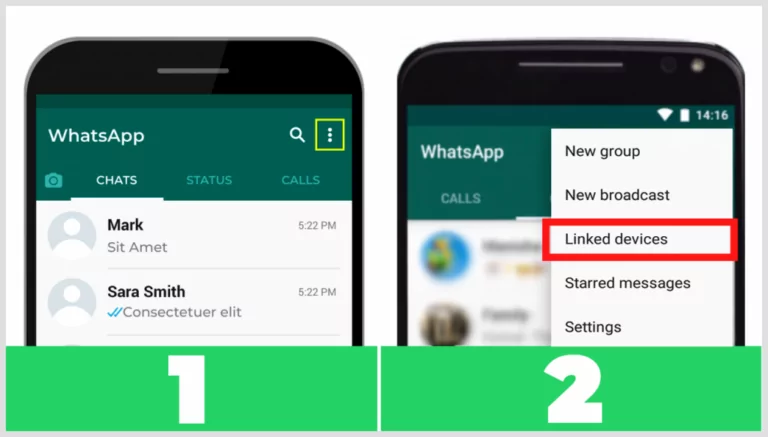
Checking WhatsApp Linked Devices is the fastest way to confirm if someone else has access to your account.
- Open WhatsApp
- Tap Settings
- Tap Linked Devices
You will see a list of all active sessions, including device type and last active time.
If you see something you do not recognize:
- Tap the device
- Press Log Out
- Confirm
This will immediately remove access from that device and stop WhatsApp monitoring from that session.
How to Secure Your WhatsApp Account
Turn On WhatsApp Screen Lock
Screen lock adds Face ID, fingerprint, or a PIN to protect your WhatsApp app.
- Open Settings
- Go to Privacy
- Tap Screen Lock
- Enable it
This prevents others from opening WhatsApp even if they unlock your phone.
Enable WhatsApp Two-Step Verification
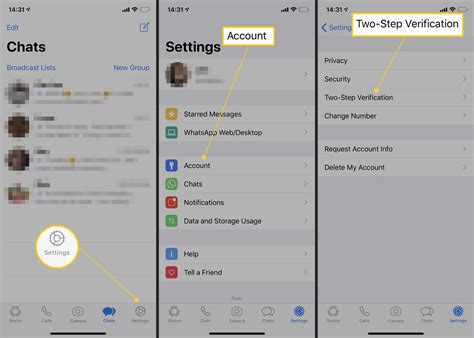
Two-step verification adds a six-digit PIN that protects your account from being re-registered on another device.
- Open Settings
- Go to Account
- Tap Two-step verification
- Turn it on and set a PIN
Even if someone gets your WhatsApp verification code, they still cannot access your account without this PIN.
Protect Your SIM Card
Your phone number is tied to your WhatsApp account. If someone takes control of your SIM card, they can receive your messages and verification codes.
- Add a SIM PIN in your phone settings
- Ask your mobile carrier about SIM swap protection
- Never share SMS verification codes
Avoid Fake QR Codes
Only use QR codes inside WhatsApp Linked Devices. Never scan QR codes from unknown sources, websites, or messages.
Fake QR codes can silently connect your WhatsApp to another device without warning.
Keep WhatsApp Updated
Regular updates fix security problems that could be used for WhatsApp monitoring. Turn on automatic updates or update the app manually often.
What to Do If Someone Is Monitoring Your WhatsApp
If you think your WhatsApp account is being monitored, act immediately:
- Log out of all WhatsApp Linked Devices
- Change your phone lock PIN or password
- Turn on WhatsApp two-step verification
- Contact your mobile carrier to secure your SIM card
- Warn your contacts if messages were sent from your account
Quick action limits how much access someone has to your messages and personal data.
Conclusion
Most WhatsApp monitoring cases happen because someone gets access to a phone, a QR code, or a verification code. Once you understand how to know if someone is monitoring your WhatsApp, you can spot the warning signs early and act fast.
Check WhatsApp Linked Devices regularly, enable screen lock and two-step verification, and never share your verification code. These simple steps are enough to stop most WhatsApp hacking attempts.
Tags: how to secure WhatsApp, WhatsApp account hacked, WhatsApp hacking, WhatsApp linked devices, WhatsApp monitoring, WhatsApp privacy, WhatsApp security, WhatsApp tips, WhatsApp verification code, WhatsApp Web
Category: Learning & How to